Pop-up Channels v5.0
This version adds episodic scheduling, playlist blocks that match their playlist's length, and an EPG preview in the scheduler.
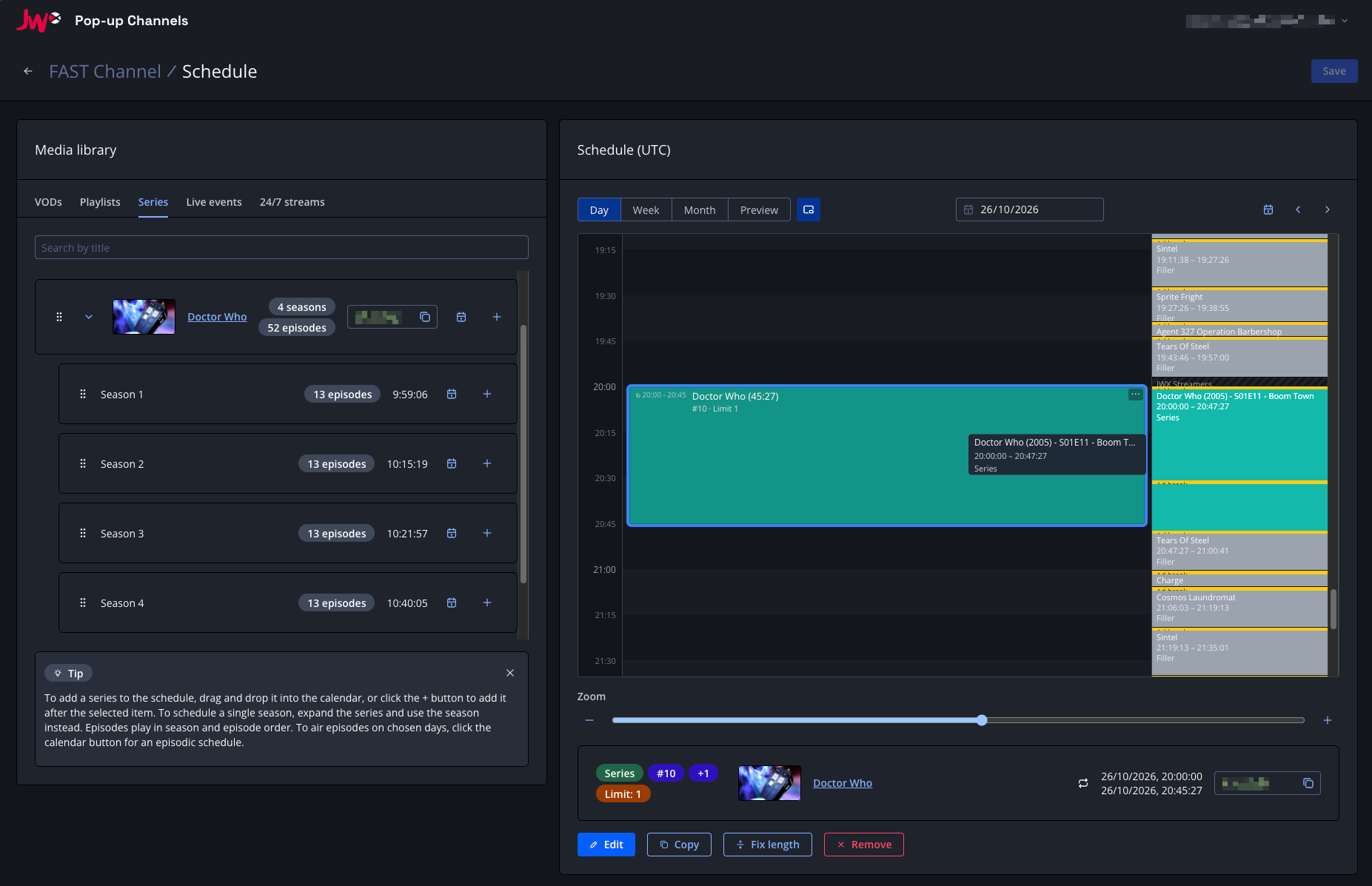
New features
Episodic schedules
You can now play episodes in order across a recurring schedule, for example to air the next episode of a playlist or series each day.
Click the calendar button next to a playlist, series or season to create an episodic schedule. Choose the days and time it airs, how many episodes each airing plays, whether to play them in a random order, and when the schedule ends.
Recurring playlist blocks also have a new Start index increment option, which moves each occurrence further into the playlist than the last.
Match playlist length
Playlist and series blocks have a new Match playlist length option, which sizes the block to play its content exactly once. The end time is calculated for you, including ad breaks when SSAI is enabled, and is kept up to date as videos are added to or removed from the playlist.
EPG preview in the scheduler
The scheduler now shows a timeline of what your channel will actually play alongside your schedule, including filler, slate and ad breaks.
The EPG preview on the channel details page now also lets you choose a date range.
Series scheduling
If your account has access to JWX series, the scheduler's media library now includes a "Series" tab. You can schedule a whole series, or a single season, as a block of content, just like a playlist.
Series blocks support the same options as playlist blocks, including episodic scheduling. Episodes added to the series in JWX are included automatically. Requires an entitlement, please speak with your JWX representative for details.
Other improvements
Other improvements in this version include:
- A new filler playlist option, "Allow filler VODs to be cut short", so the last filler VOD before your scheduled content can be cut short to fill the gap instead of showing the slate
- Playlist blocks in the scheduler now show their start index and item limit
- Copy and paste in the scheduler now lets you right-click to paste at a chosen time or at the original time
- A new playlist length endpoint to calculate the length of a playlist block without saving it
Bug fixes
- Fixed a bug where the slate was shown instead of the filler playlist after a playlist block's last VOD.