Audio
Pop-up Channels lets you deliver multiple audio tracks on a channel using an audio configuration. This is useful for offering several languages, or additional tracks such as audio description or commentary.
Audio configurations apply to channels with demuxed audio. Selecting an audio configuration on a channel automatically enables demuxed audio.
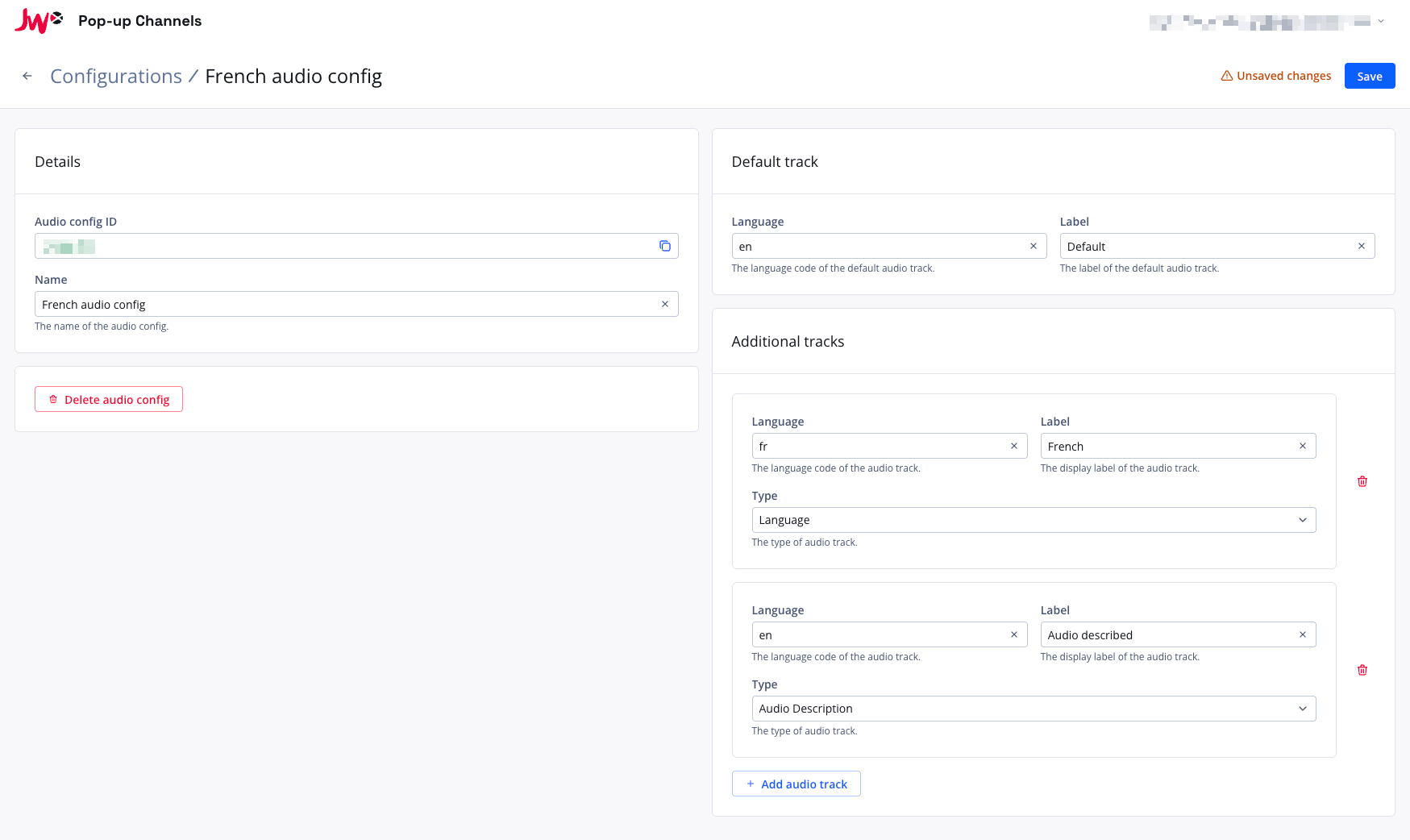
Setting up audio tracks
To deliver multiple audio tracks on a channel, you will first need to create an audio configuration.
- In the Pop-up Channels front-end, click your email address in the top right corner, then "Configurations"
- Next to "Audio", click "Create audio config"
- Under "Name", enter a name for your audio configuration
- Under "Default track", set the "Language" and "Label" for the track that should be used by default
- Under "Additional tracks", click "Add audio track" for each extra track, and set:
- Language - the language code of the audio track
- Label - the label to use for the audio track
- Type - the kind of track: Audio Description, Commentary, Language, Music or Other (optional)
- Click "Save"
You can then select this audio configuration when creating or updating a channel.
The Pop-up Channels system will try to match your configured audio tracks with the audio tracks on your JWX VODs by language and label. Every audio configuration has exactly one default track, which is used when no other track is selected during playback.
Updating an audio configuration
When an audio configuration is associated with a running channel, you will not be able to make updates to it. You must stop all associated channels first.