Server-side Ad Insertion (SSAI)
Pop-up Channels supports inserting ad slates and SCTE markers into the stream for use with SSAI.
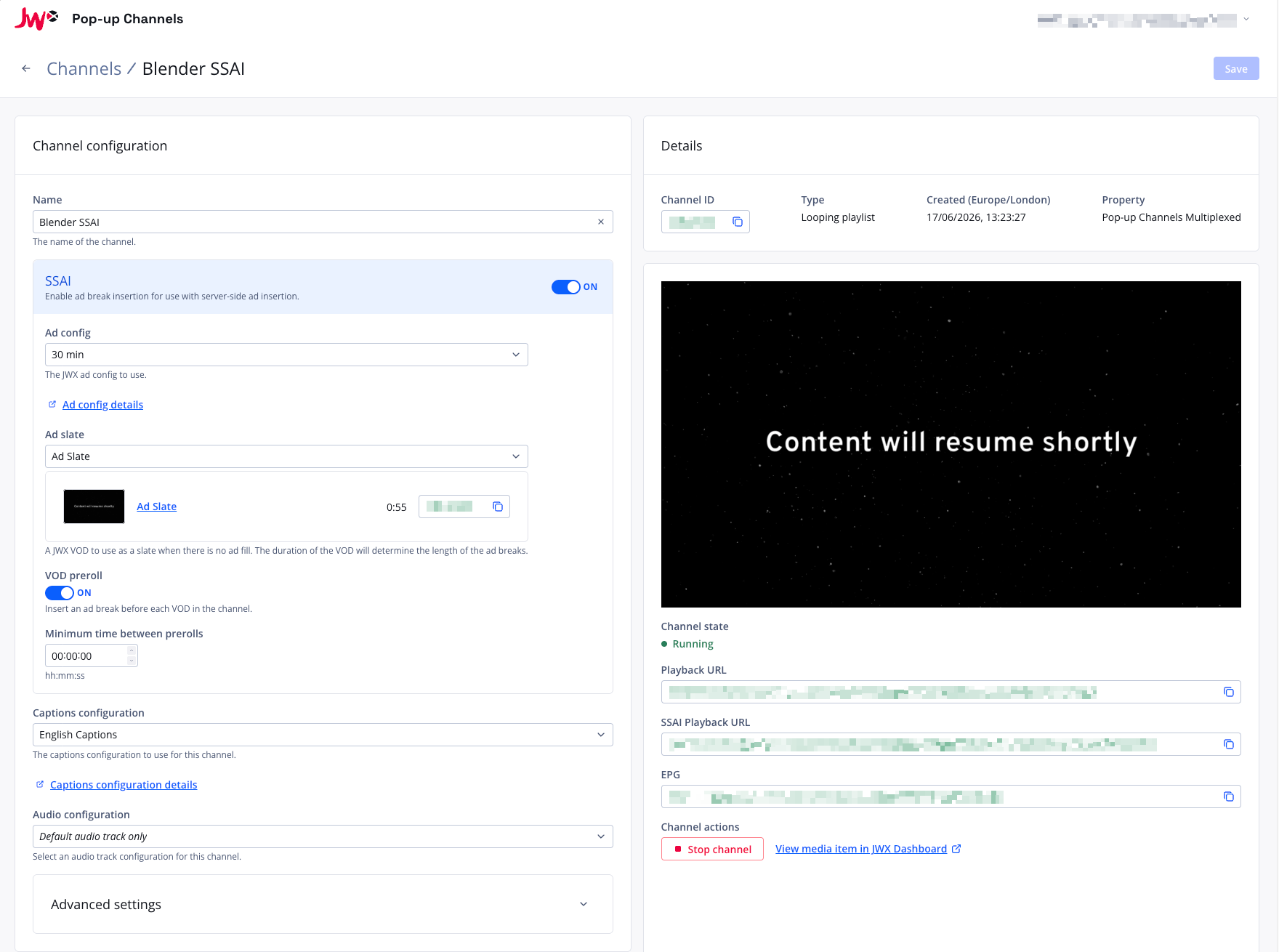
If you enable SSAI for a channel, ad breaks will be inserted based on the JWX ad config you provide, as well as your media-level ad cues.
These ad breaks can then be used for ad insertion with JWX SSAI.
Setting up SSAI for a channel
Please note, to use SSAI with Pop-up Channels your JWX account must have the following entitlements:
- App Config
- Per Media Ads
- Server Side Ads
Please speak with your JWX representative if you are unsure whether you have these entitlements, or to discuss enabling them.
While creating or updating a channel:
- Under "SSAI", click the toggle to "on"
- Under "Ad Config", select your JWX ad config
- Under "Ad Slate", select a JWX VOD to use as a slate. Please note:
- The length of this slate will determine the length of your ad breaks.
- The ad slate must be in the same property as your channel.
- Optionally, enable "VOD preroll" to insert an ad break before each VOD in the channel
- Optionally, set "Minimum time between prerolls" to limit how often preroll ad breaks are inserted. When set, a preroll is skipped if another preroll was inserted within this period. Leave it at zero to disable this cooldown.
- For scheduled channels with live mixing, optionally enable "Live ad blanking" to replace commercials in live sources with the ad slate. See Live ad blanking.
For scheduled channels, the minimum time between prerolls works on 2 separate timers, one for VODs that come from filler, scheduled playlists or scheduled series, and one for individually scheduled VODs. This means that an individually scheduled VOD will not affect the prerolls for VODs from a playlist, and vice versa. Individually scheduled VODs will still affect the prerolls of other individually scheduled VODs.
Once the channel has been created or saved, you can then grab the SSAI playback URL on the right side of your screen to use on your website or apps.
Per-item ad break controls
For scheduled channels with SSAI enabled, you can override the ad break behaviour for specific parts of your schedule:
- Filler playlist: from the channel detail page, you can disable ad breaks for the filler playlist or override its preroll setting.
- Scheduled playlist and series blocks: when editing a scheduled playlist or series on the scheduler, you can disable ad breaks for the entire block or override its preroll setting.
- Individual scheduled VODs: when editing a scheduled VOD, you can disable ad breaks for that VOD or override its preroll setting.
Each control has the same semantics:
- Insert ad breaks: a simple on/off toggle. Defaults to on. When off, no ad breaks (and no slate padding) are inserted for that item.
- Preroll: choose "Use channel default" (the channel's "VOD preroll" setting applies), "Yes" (force preroll on for this item), or "No" (force preroll off for this item).
These per-item overrides are only available when SSAI is enabled at the channel level. If you turn SSAI off on the channel, all per-item overrides are ignored.