Captions
Pop-up Channels supports using WebVTT or SRT captions from your JWX VODs.
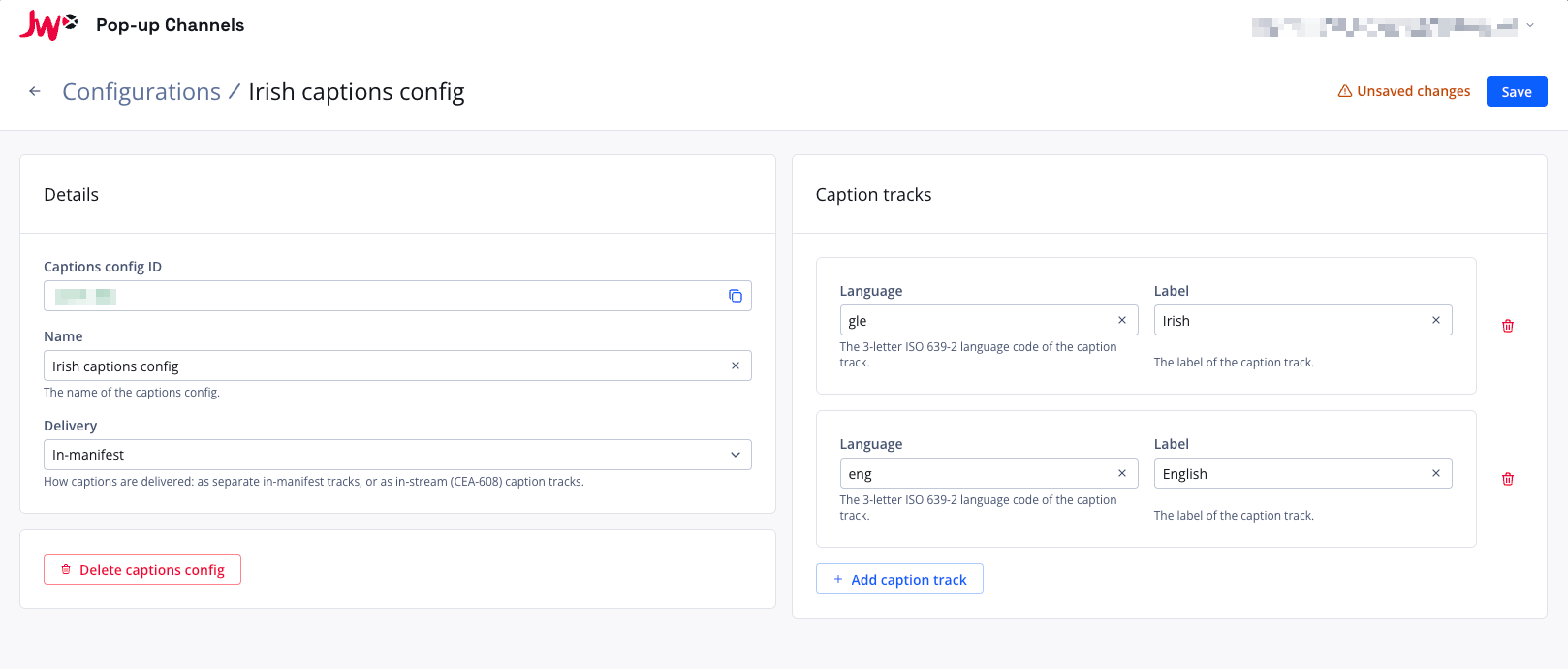
Setting up captions
To set up captions for a channel, you will first need to create a captions configuration.
- In the Pop-up Channels front-end, click your email address in the top right corner, then "Configurations"
- Next to "Captions", click "Create captions config"
- Under "Name", enter a name for your captions configuration
- Under "Delivery", choose how captions should be delivered (see Delivery modes below)
- Under "Caption tracks", click "Add caption track"
- Under "Language", enter the 3-letter ISO 639-2 language code of the caption track
- Under "Label", enter the label to use for the caption track
- Repeat steps 5 to 7 for each caption track
- Click "Save"
You can then select this captions configuration when creating a channel.
Updating a captions configuration
When a captions configuration is associated with a running channel, you will not be able to make updates to it. You must stop all associated channels first.
Delivery modes
You can choose how captions are delivered:
- In-manifest (default): captions are delivered as separate caption tracks in the manifest. For Traditional VOD, the sidecar WebVTT captions from your VOD are used. For CMAF VOD, the configured caption tracks are matched to the caption tracks already present in the manifest.
- In-stream: captions are delivered as in-stream (CEA-608) caption tracks. Select this only if your content already contains in-stream captions.
The Pop-up Channels system tries to match your configured caption tracks with the caption tracks on your JWX VODs by language and label. Caption tracks that cannot be matched are left out.